A screw-lock strap, because a tag anyone can unclip is a tag anyone can remove
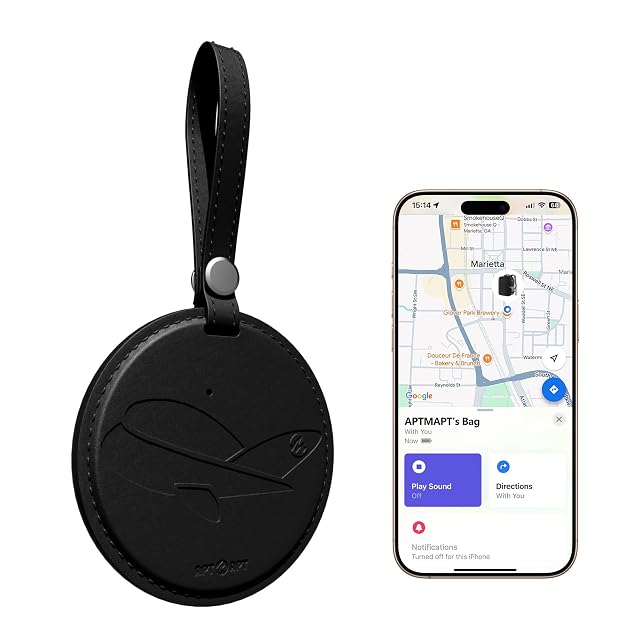
APTMAPT APT018 leather Find My luggage tag
The cheapest tracker in the American half of this hub, and the only external tag here that addresses the obvious problem with an external tag.
Of the eight devices in the American half of this hub, this is the cheapest and the one that has thought hardest about the obvious objection to its own shape. The buying tip at the top of this page says to put a tracker deep inside the case rather than in a pocket somebody can reach, because a tracker that can be found can be removed. Four of the seven Find My devices here hang on the outside of the bag. This is the only one of the four to say anything about it: the strap closes with a metal screw connector, and the bullet makes the comparison explicit — unlike adjustable straps or metal buckles, which anyone can unfasten.
That is a real answer rather than a complete one. A screw needs a coin and a moment, where a buckle needs a thumb; a knife needs neither, and a tracker sewn into a lining needs to be found first. What the screw also means is that you need the coin too, every time you want the tag off.
The rest of the page is unusually complete for the price. Two writable ID cards sit behind a clear window, so a handler who finds the bag can read a name without opening or unlocking anything — which is the half of the job a tracker cannot do, and which this hub covers on a separate shelf of plain luggage tags. The dimensions are published, 3.2 by 2.9 by 0.2 in. Battery is six months from a 90-minute wireless charge, and the page says outright that the charger is not supplied. There is a one-year warranty.
What is missing is any water or dust rating, where five of the eight devices on this shelf publish one, and any figure for the sound or the Bluetooth range, where two publish both. And like seven of the eight here, it is Apple Find My only: it relays through other people’s iPhones, which is why it works best in a crowded airport and why there is no Android version at all.
Availability
Read on the day this page was built: $10 at the American Amazon shop.
Read from Keepa on the day this page was last revised; stock and price both move without notice.
Prices quoted in this text were read on 2026-10-07. The live price is at the top of the page.
What travelers ask
Does a screw-lock strap solve the external-tag problem?
It solves half of it. This shelf's buying tip asks you to mount a tracker deep inside the case rather than in an accessible outer pocket, for the simple reason that anything reachable can be removed — and four of the seven Find My devices on this shelf are tags or cards designed to be on the outside. This is the only one of those four to acknowledge it: a heavy-duty strap with a metal screw connector that "stays permanently attached to your luggage until you decide to remove it", against the adjustable straps and metal buckles the bullet says anyone can unfasten. What it cannot do is stop someone cutting the strap, and a tracker inside the lining cannot be found at all.
Why have ID cards as well as a tracker?
Because the two work on different people. A tracker tells you where the bag is; a legible name and number behind a clear window tells the baggage handler who found it where to send it, with no app, no phone and no unlocking. This is the pairing that makes a smart luggage tag more than a tracker in a leather case, and this hub has a whole shelf of plain luggage tags that do only the second half of the job.
How often does it need charging?
Twice a year, by its own figures: 90 minutes of wireless charging for up to six months of use. That sits in the middle of this shelf, where the range runs from 12 months per charge down to an average of five days for the cellular tracker here. What the page says plainly, and it is worth noting, is that the wireless charger is not in the box — so a Qi pad or a MagSafe puck has to exist in your house already.